Skip to content

One desk for every fee.

EK Desk is the fee register for a preschool's transport and daycare: who has paid, who is pending, who is overdue, and what the office has spent, across every branch and year.

The dashboard

See where every rupee stands.

One screen per service. The figures on top, and under them the charts that explain the figures.

2026-27 · All branches
Students enrolled118
Total receivable₹8,46,000
Total collected₹5,13,000
Collection rate60.6%

Where the receivable stands

Whole year, as of today

  • Collected₹5,13,000
  • Pending, not yet due₹1,85,000
  • Overdue₹1,48,000

Collected each month

By the date the payment was made

Collected by month
MonthCollected
April 2026₹94,000
May 2026₹61,000
June 2026₹1,12,000
July 2026₹73,000
August 2026₹49,000
September 2026₹56,000
October 2026₹37,000
November 2026₹31,000
December 2026₹0
January 2027₹0
February 2027₹0
March 2027₹0

How old the pending is

By due date

  • Not yet due₹1,85,00041 accounts
  • 1–30 days late₹62,00012 accounts
  • 31–60 days late₹49,0007 accounts
  • Over 60 days late₹37,0005 accounts

By class

Share of fees collected

  • Nursery
    68%₹1,79,000 of ₹2,64,000
  • Play Group
    53%₹1,16,000 of ₹2,18,000
  • Euro Junior
    67%₹1,34,000 of ₹2,01,000
  • Euro Senior
    52%₹84,000 of ₹1,63,000
  • Collected
  • Pending

By route

Share of fees collected

  • Route 1 - MG Road
    65%₹1,62,000 of ₹2,51,000
  • Route 2 - Whitefield
    56%₹1,24,000 of ₹2,23,000
  • Route 3 - HSR Layout
    66%₹1,31,000 of ₹2,00,000
  • Route 4 - Indiranagar
    56%₹96,000 of ₹1,72,000
  • Collected
  • Pending

Sample figures, shown in the same components the signed-in dashboard uses.

What it does

Everything the office tracks, in the same place.

Fees

Every fee account, one place

Transport and daycare fees for every student, per branch and academic year, updated the moment a payment is recorded.

  • Receivable, collected, pending and overdue at a glance
  • Overdue worked out from the due date, never typed in
  • A wrong payment is voided, not erased. Both stay on record

Charts

The usual questions, already answered

Each dashboard draws the figures the office asks about most, from the same records as the tables.

  • How much came in each month
  • How old the pending money is: 30, 60, over 60 days
  • Which class, route or daycare slot is behind

Payment requests

Ask a parent to pay, over WhatsApp

Send a ready-written message with a pay link by WhatsApp or SMS. The parent pays by UPI or bank transfer and reports it; the office confirms it before it counts.

Students

One directory for both services

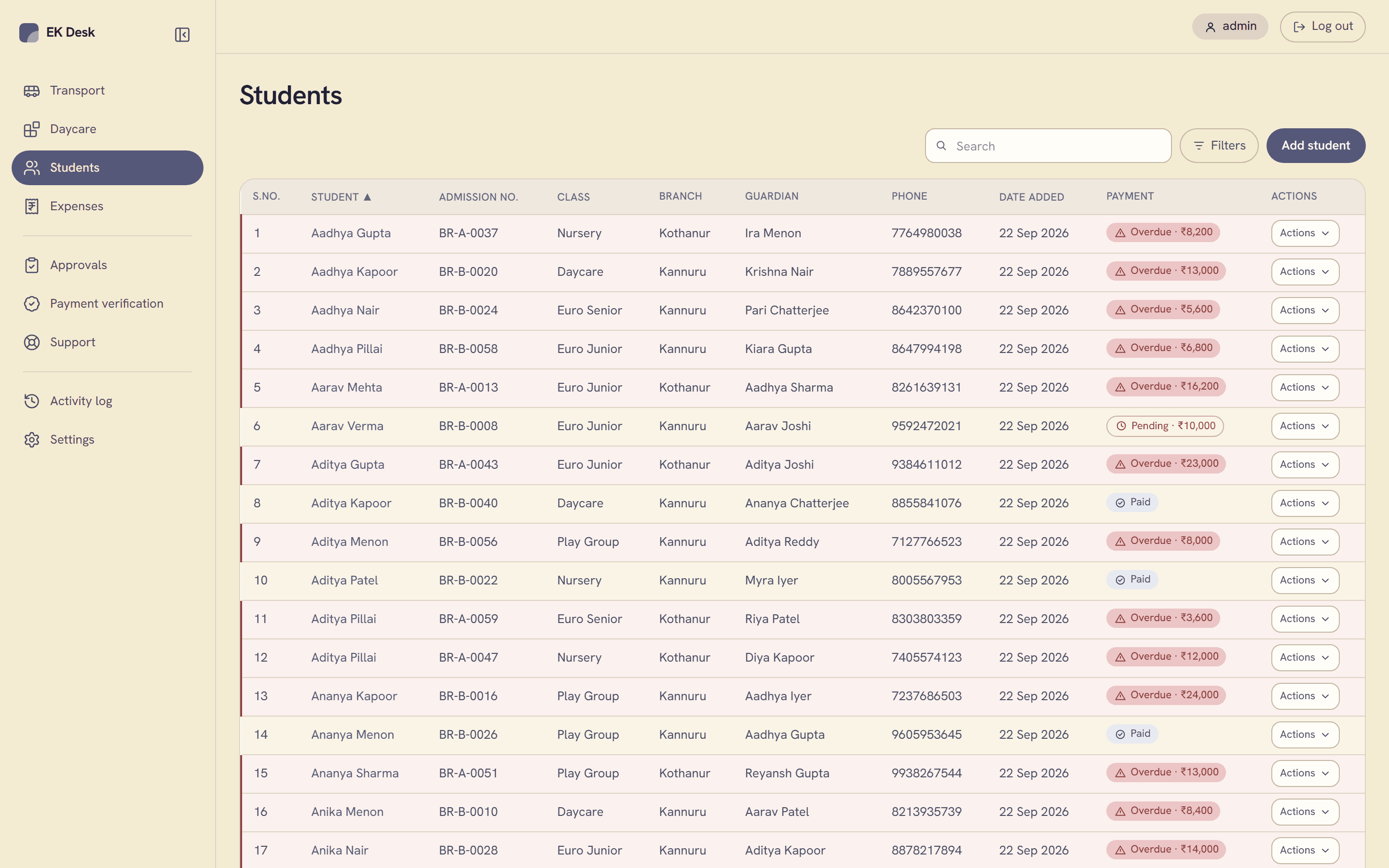
Search by name, filter by class, status, service or year, and open any student to see every fee account and payment they have ever had. Re-enroll for a new year in one step.

Expenses

What the office spends, too

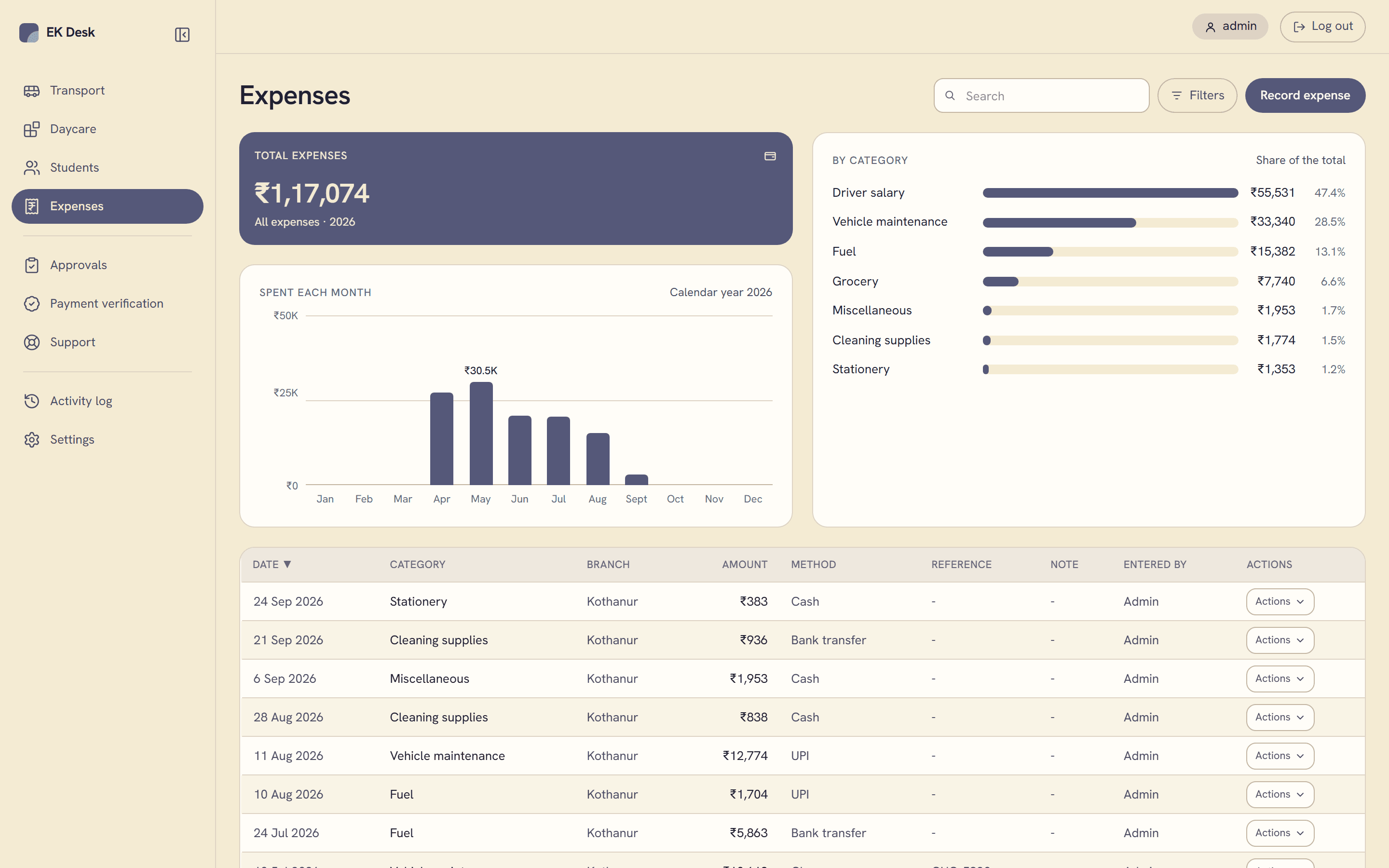
Salaries, fuel, repairs and supplies, recorded by category, charted by month, and filtered by branch, method or any date range.

Roles

Teachers see their own branch

A teacher adds students and records payments for their branch only. Deleting a student goes to an admin for approval first.

Audit

Every change, logged by itself

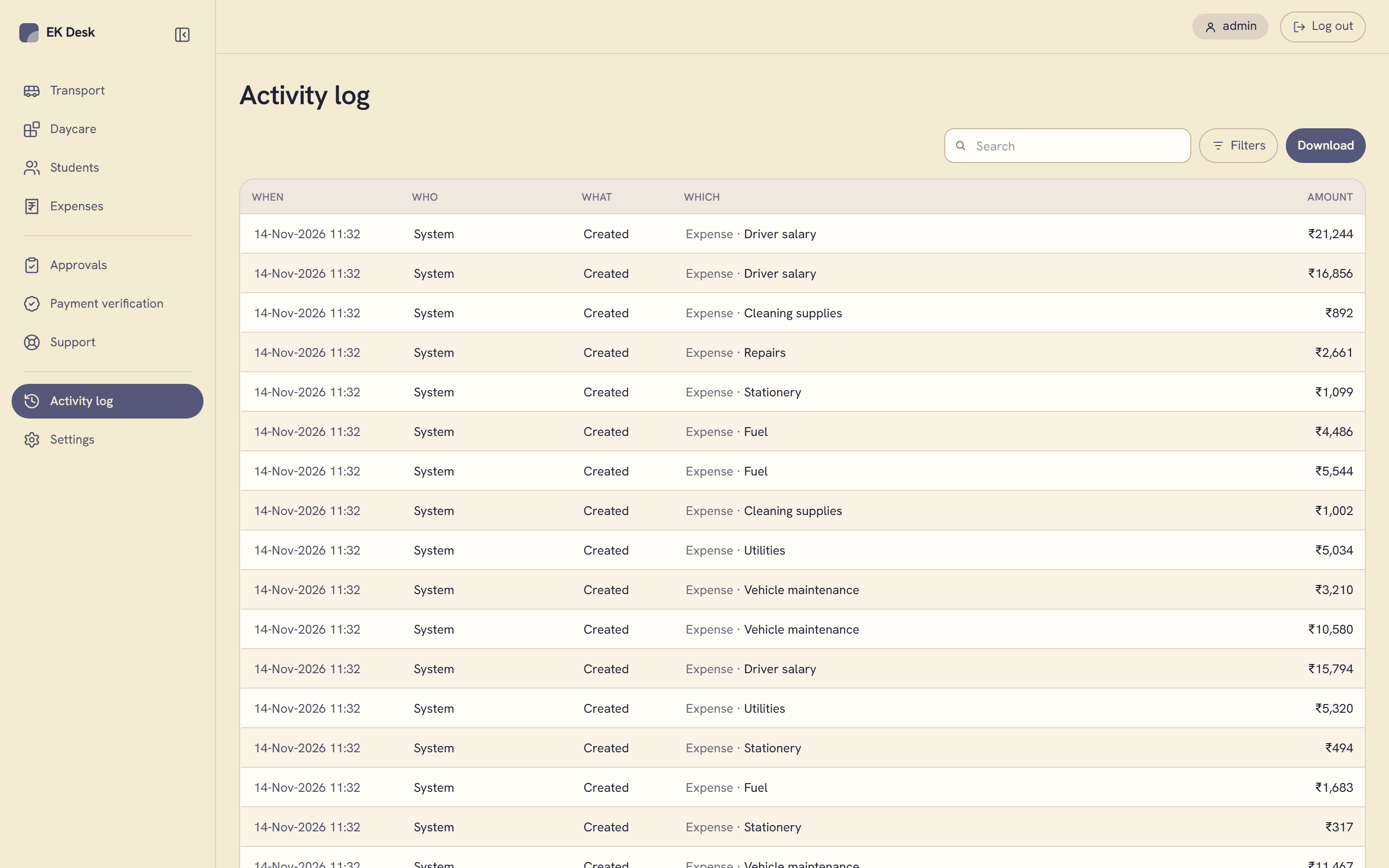
Who did what, to which record, and when. Written by the database as it happens, so nobody can forget to log a change or skip it.

Exports

Excel when you need it

Click a figure to download the rows behind it as a spreadsheet, with the same filters applied: pending fees, a month of expenses, the activity log.

Who uses it

Two logins, two jobs.

Admin

Runs the office. Sees every branch.

  • Transport and daycare dashboards for all branches
  • Confirms or rejects payments parents report
  • Approves a teacher's request to delete a student
  • Sets up branches, years, teacher logins and collection accounts
  • Reads the full activity log and downloads it

Teacher

Works one branch. Sees only that branch.

  • Adds and edits students, and re-enrolls them
  • Records payments and voids a mistaken one
  • Sends a parent a payment request
  • Records the branch's expenses
  • Messages an admin for help from any screen

How it works

Four steps, always in this order.

Every time a fee gets tracked, from enrollment to reconciled.

01

Add a student, open a fee account

A transport or daycare account carries its own receivable, due date, and route or slot, set once when the student enrolls.

02

Record each payment as it lands

Cash, UPI, cheque, or bank transfer. A correction voids the original entry and leaves both visible. Nothing is ever quietly edited or deleted.

03

Pending and overdue, computed live

Never a stored figure that can go stale: what's owed and what's late is worked out the moment the page loads, from the payments actually on file.

04

It rolls up the moment it happens

Transport, daycare, and expense dashboards update instantly, split by branch and academic year. Every change lands in the activity log automatically.
What it looks like

Four screens do most of the work.

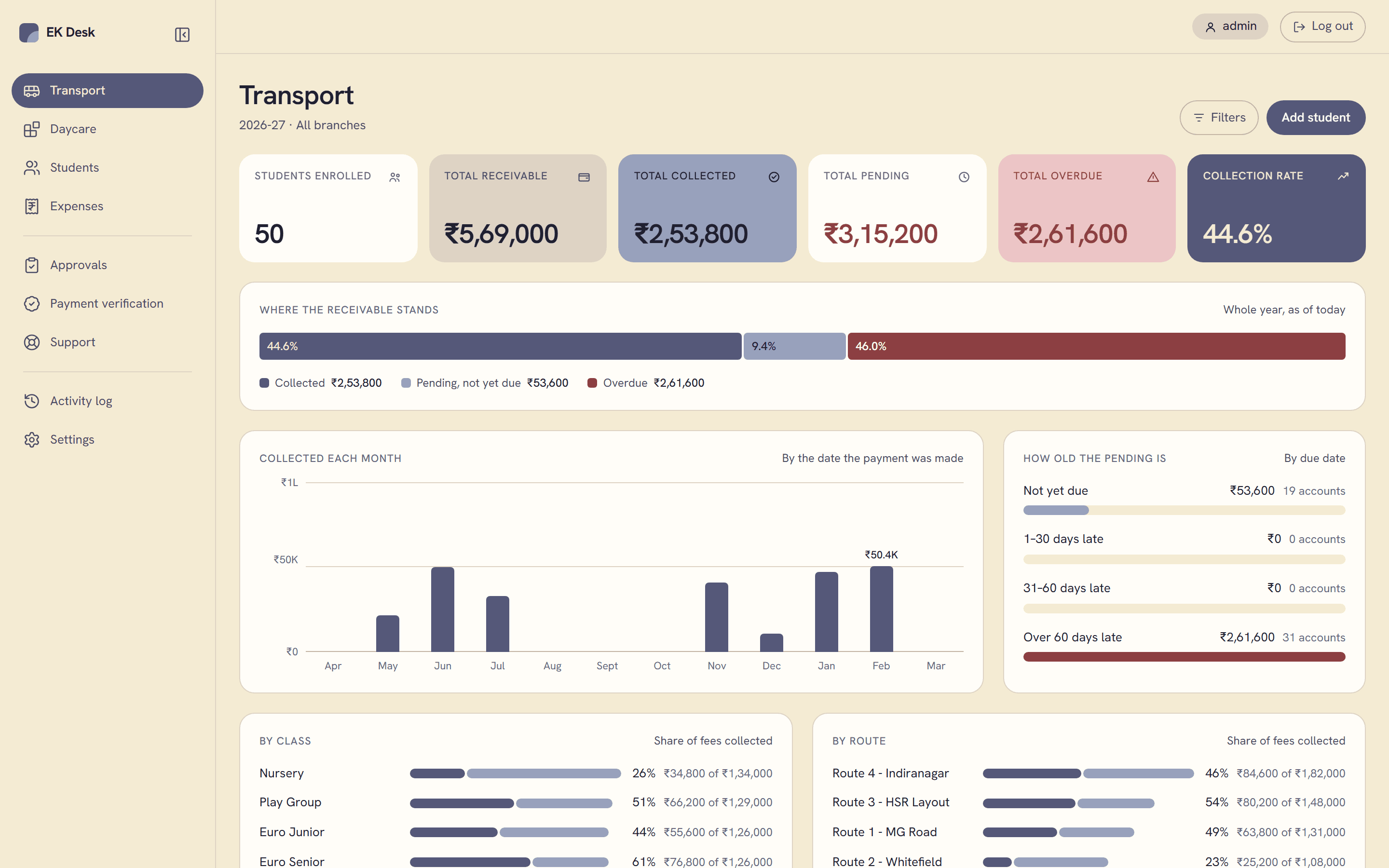
Transport dashboard with stat tiles, a collection progress bar, a monthly collections chart and an ageing chart
Student directory listing students across both branches with payment status chips and per-row actions
Expenses page with a total, a spend-by-month chart, a category breakdown and the expense list
Activity log listing every create, edit, and delete across the app with who did it and when

Transport

Receivable, collected, pending and overdue, with charts

The register is where you left it.